
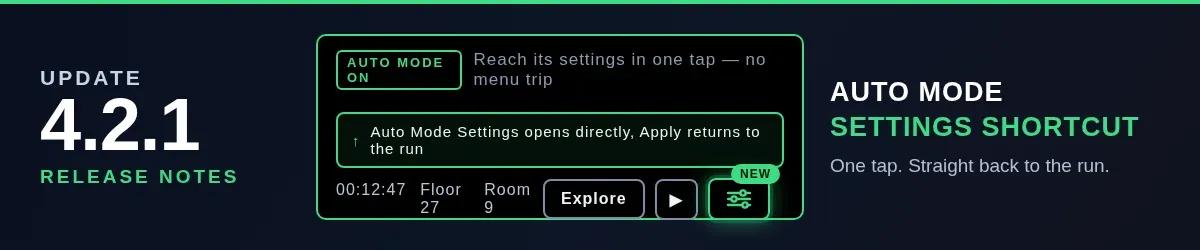
Update 4.2.1: Auto Mode Settings Shortcut
September 13, 2026
Update 4.2.1 adds a direct Auto Mode settings shortcut next to the dungeon controls, returns to the run after applying settings and fixes the level-up preview for the Shadow Cat attack speed bonus.
by 7underlines
developer @ Werkstattl
Update 4.2.1 is a quality-of-life patch. The headline change: Auto Mode settings are now one tap away from the dungeon, and closing them puts you right back in the run.
The sliders button on the control row
Auto Mode has its own preferences — target floor, retreat rules, and related toggles. Until now, reaching them meant leaving the dungeon view through the main menu first.
Next to the dungeon controls you now have a compact sliders button:
- It opens the existing Auto Mode settings directly, without the intermediate menu step.
- It appears as soon as Auto Mode is unlocked — including runs where the Auto toggle itself is hidden, so the preferences stay reachable.
- The dungeon pauses while the settings are open, exactly like any other in-game menu.
Applying settings returns you to the run
Opening the settings through the shortcut used to have a quirky side effect: pressing Apply or closing the panel dropped you into the main menu, even though you never came from there.
The game now remembers how you entered the settings:
- Shortcut → Apply or close: both panels close, brightness is restored and you are back in the dungeon.
- Main menu → Auto Mode → Apply: still returns to the menu, as before.
Level-up preview fix
The attack speed preview shown during a level-up reroll ignored the Shadow Cat companion’s bonus, which made the projected APS look lower than the real result. The preview now includes companion bonuses, so the number you confirm is the number you get.
Changelog
- Added a direct Auto Mode settings shortcut beside the dungeon controls
- Fixed returning to the main menu after applying Auto Mode settings opened from the shortcut
- Fixed the level-up preview not counting companion attack speed bonuses (Shadow Cat)
- Minor modal layout adjustment to prevent overflow on some screens
The update is live on Google Play and on the web version. No save migration is needed — existing runs continue unchanged.
Play now:
Read the full release notes on GitHub.
Share this post
Like this post? Share it with your network!